How do early, late and night shifts rotate?
Shift scheduling
Defined shift types, recurring series and operational rotation patterns are the focus. This page is the commercial owner for that search intent.
Online shift planner for SMEs
Create shift templates, map recurring series, copy complete weeks and share published schedules directly with your team — without juggling multiple spreadsheet versions.
No credit card · Cancel monthly · Hosted in Frankfurt
24-hour operation
Example: a rotation pattern across one week
Team A
Team B
Team C
Team D
Separate the concepts
Shift schedules, staff rosters and workforce planning are often used interchangeably. When selecting software, the actual focus matters.
How do early, late and night shifts rotate?
Defined shift types, recurring series and operational rotation patterns are the focus. This page is the commercial owner for that search intent.
Who works when?
Operational week or month planning assigns specific employees to working times and publishes the completed roster.
Who fits which assignment?
Availability, qualifications, location and minimum staffing help planners select a suitable person for each assignment.
How can I start without software?
For small, stable teams, a spreadsheet template may be enough. It is a download rather than a jointly maintained online planning process.
Still comparing different types of software? Use our guide to staff scheduling software . Or start with the free shift schedule template.
The product workflow
Shiftdesk does not automate the staffing decision. It connects the steps that otherwise get lost between templates, spreadsheets, chat messages and noticeboards.
Save early, late, night or custom shifts with start, end, break, colour and minimum staffing as reusable templates.
Create recurring shift series or copy an already planned week into the next planning period.
Consider availability, absences, skills, location and planned hours while assigning employees with drag and drop.
Check staffing and conflicts; Pro and Enterprise also add configurable work-time guidance for the review.
Release the reviewed version. Employees then see their shifts in the app and can provide relevant feedback.
For the detailed week-planning workflow, see our dedicated guide: create a staff schedule online
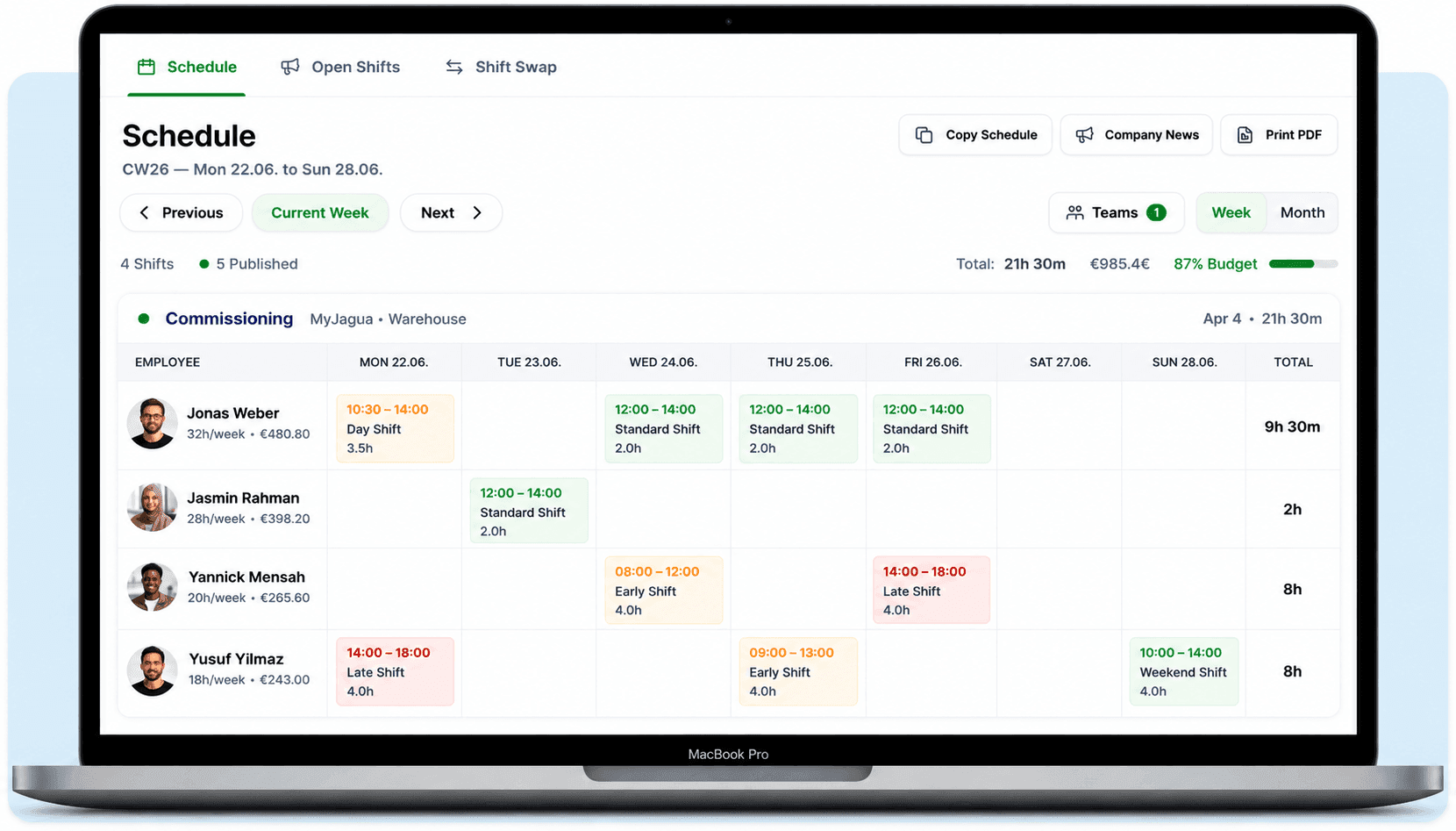
Real product view
No invented interface: this is the real Shiftdesk weekly planner with employees, shifts, hours, week copy, month view and PDF output.
Verified capabilities
The features connect planning, coordination and later working time without pretending to provide fully automatic optimisation.
Work in detail in the weekly planner and use the month grid to review longer periods, absences and hour totals.
Save recurring shift building blocks with times, breaks, colour and staffing targets for reuse.
Repeat shifts at selected intervals or copy an existing week as the starting point for a new one.
Make minimum staffing, availability, absences and skills visible during manual assignment.
From Pro, configurable guidance for duration, breaks, weekly hours and rest periods supports the review before release.
Publish open shifts, process applications and coordinate shift swaps through the defined approval workflow.
Employees see published shifts on mobile and can additionally subscribe to their personal schedule using iCal.
Connect scheduled shifts with recorded working time and trace differences for time accounts or payroll preparation.
Shiftdesk does not create AI-based staffing forecasts, distribute shifts automatically for fairness or optimise rotation models on its own. Demand, patterns and final staffing remain decisions made by your business.
Map shift models
Shiftdesk does not prescribe a shift model. You map the working times defined by your business using templates, series and copied weeks.
Early and late
For extended opening or operating hours without a permanent night shift.
Early, late and night
For 24-hour operations with clearly defined shift transitions.
Several teams alternating
Map operationally defined sequences of work and off blocks as series or weekly patterns.
Two work blocks per day
Plan separate shifts on the same day while keeping the total scheduled time visible.
Multiple places of work
Structure shifts by location, department or team and limit planning responsibilities.
The software maps the model you choose. It does not assess its occupational-science suitability and does not replace a collective-agreement or legal review.
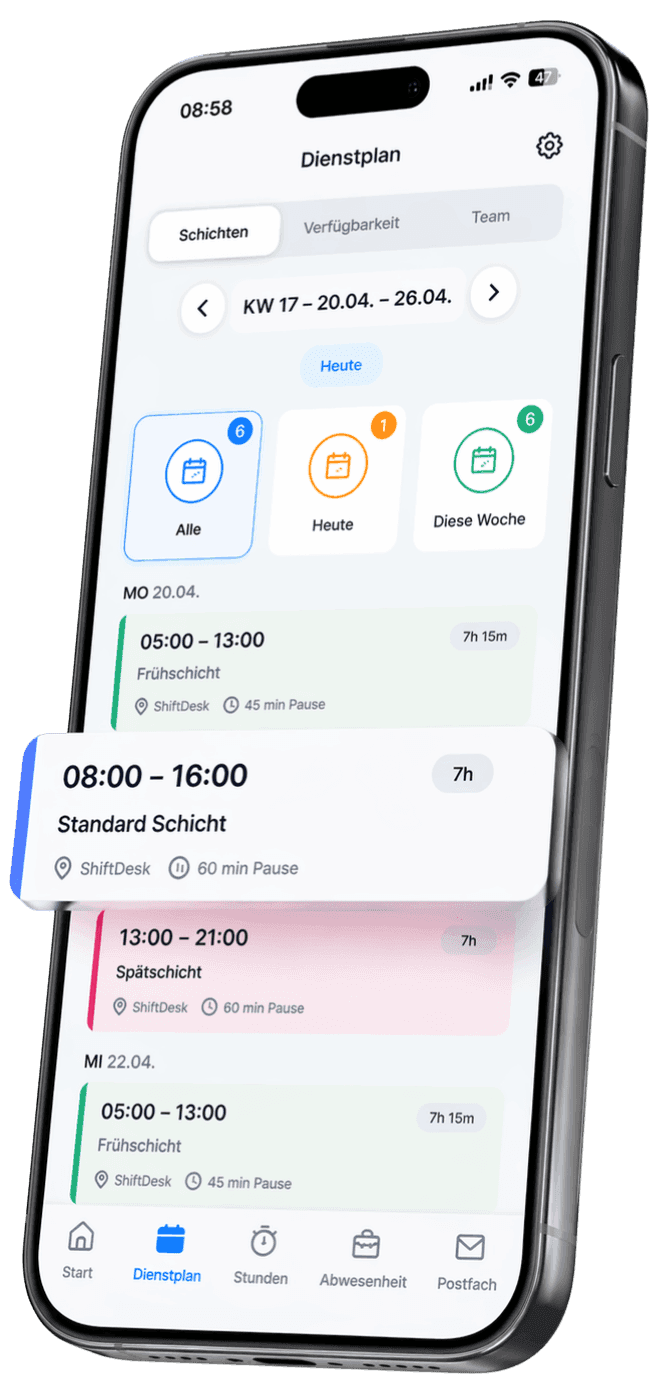
The employee perspective
Shift teams rarely work at a desk all day. In the Shiftdesk app, employees see their personal schedule and access the workflows needed when plans change.
Spreadsheet or online shift planner
Spreadsheets are not inherently wrong. The difference appears when several people change information or the schedule needs to work with absences and working time.
Spreadsheet or noticeboard
Files, printouts and chat attachments can show different versions.
Shiftdesk
Planners work on a central schedule and employees see the published version.
Spreadsheet or noticeboard
Formulas, colours and copies have to be maintained and reviewed manually.
Shiftdesk
Templates, series and week copy reduce repetitive input.
Spreadsheet or noticeboard
Information often lives in separate lists, messages or individual knowledge.
Shiftdesk
Availability and approved absences are available in the planning context.
Spreadsheet or noticeboard
Open work and swaps are coordinated outside the table.
Shiftdesk
Open-shift applications and swap requests remain connected to the schedule.
Spreadsheet or noticeboard
The target schedule and actual time have to be combined afterwards.
Shiftdesk
Scheduling, time tracking and time accounts can work together in one process.
An honest fit check
The best solution depends less on the longest feature list than on your planning model and the degree of automation you expect.
Typical use cases
The planning tools remain the same, but shift times, qualifications, locations and short-notice changes vary significantly.
Coordinate early, late and night shifts, departments and minimum staffing.
Keep 24/7 duties, qualifications and absences visible in the planning context.
Structure client sites, locations and changing teams in one plan.
Map reception, housekeeping, F&B and night operations separately.
Bring kitchen, service, peak periods and split assignments together.
Implementation without a major project
A clean foundation matters more than adding every rule on day one. Existing processes can be transferred step by step.
Add or import locations, teams, employees, contract hours and roles.
Configure shift templates, breaks, minimum staffing and recurring series for your model.
Map the existing workflow, review assignments and involve the responsible planners.
Invite the team, gather feedback and improve templates in a controlled way.
Plans
Shift scheduling, templates, week copy, open shifts, swaps, availability and skills are included in Basic. Work-time guidance, time accounts and payroll preparation are available from Pro.
per month · 6 employees included
per month · 12 employees included
per month · 30 employees included
All prices exclude VAT · Cancel anytime · No credit card required
A spreadsheet can display early, late and night shifts. But it does not automatically understand the relationship between the published schedule, availability, approved absence, an open shift, a swap request and working time recorded later. People have to keep that information synchronised across additional files and messages.
Shift scheduling software creates a shared process. Templates and series map recurring patterns, responsible planners staff the shifts and employees see the released version on mobile. Spreadsheets remain a sensible starting point for small, permanently stable teams; an online shift planner becomes particularly relevant when changes are frequent and several people are involved.
A shift model defines how operating hours and time off are distributed across teams. A two-shift model typically alternates early and late blocks. A three-shift model adds nights and can support continuous operation. Rotating models combine multiple work and off blocks across longer cycles.
Shiftdesk maps the model already defined by your business using custom shift templates, recurring series and copied weeks. The software does not generate an occupational-science optimised rotation and does not decide automatically which person should take which shift. That makes it clear which rules originate in the business and which guidance the system adds.
Night and rotating shifts bring several constraints together. German working-time rules generally include rest periods and special provisions for night work; collective agreements, sector rules and exceptions can change the assessment in a specific case. Software should therefore not promise blanket legal compliance.
In Shiftdesk, configurable guidance from the Pro plan supports the responsible review of duration, breaks, weekly hours and the gap between shifts. This guidance is a planning aid and does not replace legal advice or an individual review. Our dedicated guide explains rest periods and breaks in shift-based work in more depth.
The switch is usually driven less by a particular headcount than by the coordination effort. Typical signals include multiple schedule versions, repeated questions, separate leave lists, frequent absences or a time-consuming comparison of planned and actual hours.
A central shift planner reduces these handovers. Implementation still needs clear responsibilities: who may plan, who publishes, how swaps are reviewed and which data a location can see. Shiftdesk provides role- and location-based access; the company defines its operational workflow.
Frequently asked questions
Explore planning in depth
Compare paper, spreadsheets, simple apps and integrated workforce software honestly.
Learn moreUnderstand availability, qualifications, location and staffing as a connected planning process.
Learn moreVisualise and export a free team rotation for early, late, night and off-duty phases.
Learn moreRead about shift models, structure and common mistakes in the detailed guide.
Learn moreStart your 14-day free trial now — free and no credit card required. Or book a personal demo.