Paper or noticeboard
For very small, stable teams
- Ready without setup
- No extra software cost
As soon as shifts change, outdated versions appear. Availability, leave and working time remain separate.
Employee scheduling software for small and medium businesses
Plan shifts by drag and drop, share changes directly with the team, and keep planned and actual hours in one place.
No credit card required · Cancel monthly
Book a demoAn honest decision guide
Not every team needs a comprehensive system straight away. Team size, the frequency of changes, and whether schedules, time and absences should be managed separately or together matter most.
For very small, stable teams
As soon as shifts change, outdated versions appear. Availability, leave and working time remain separate.
For a few people with fixed hours
Formulas, versions and notifications must be maintained manually. A free template works while planning remains manageable.
For teams that only share schedules
Check whether time tracking, absences, time accounts and payroll preparation are included or require separate tools.
For rotating shifts and growing teams
Shiftdesk starts at €25 per month plus VAT and makes most sense when manual coordination regularly consumes time.
For a simple start, the free schedule template may be enough. Our detailed guide compares Excel and scheduling software.
Real product views
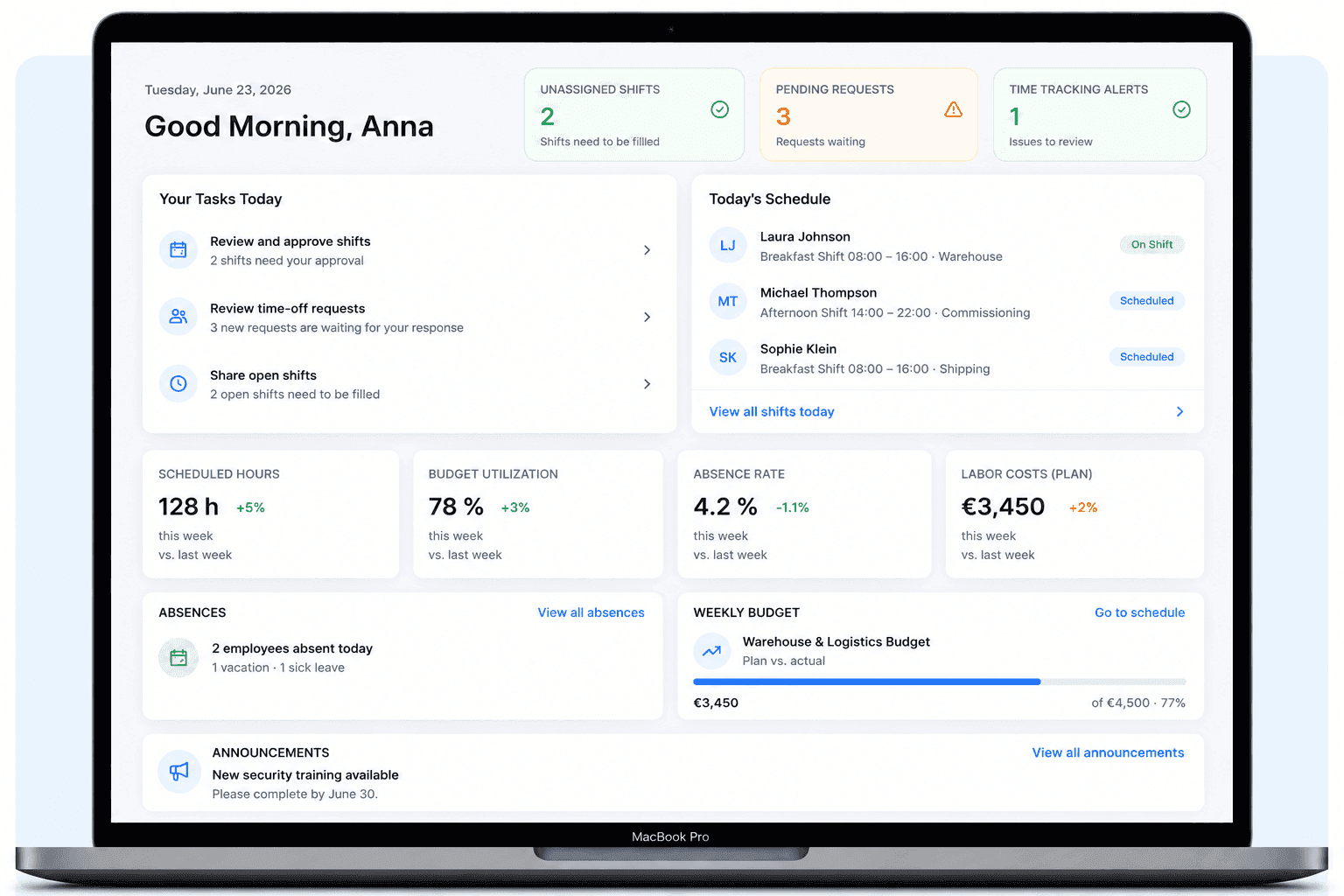
Shiftdesk connects shift planning with the workflows before and after it. You see not only who is scheduled, but also absences, recorded time and important alerts.
Create shifts, assign people and copy recurring weeks. Open shifts stay visible before you publish the schedule.
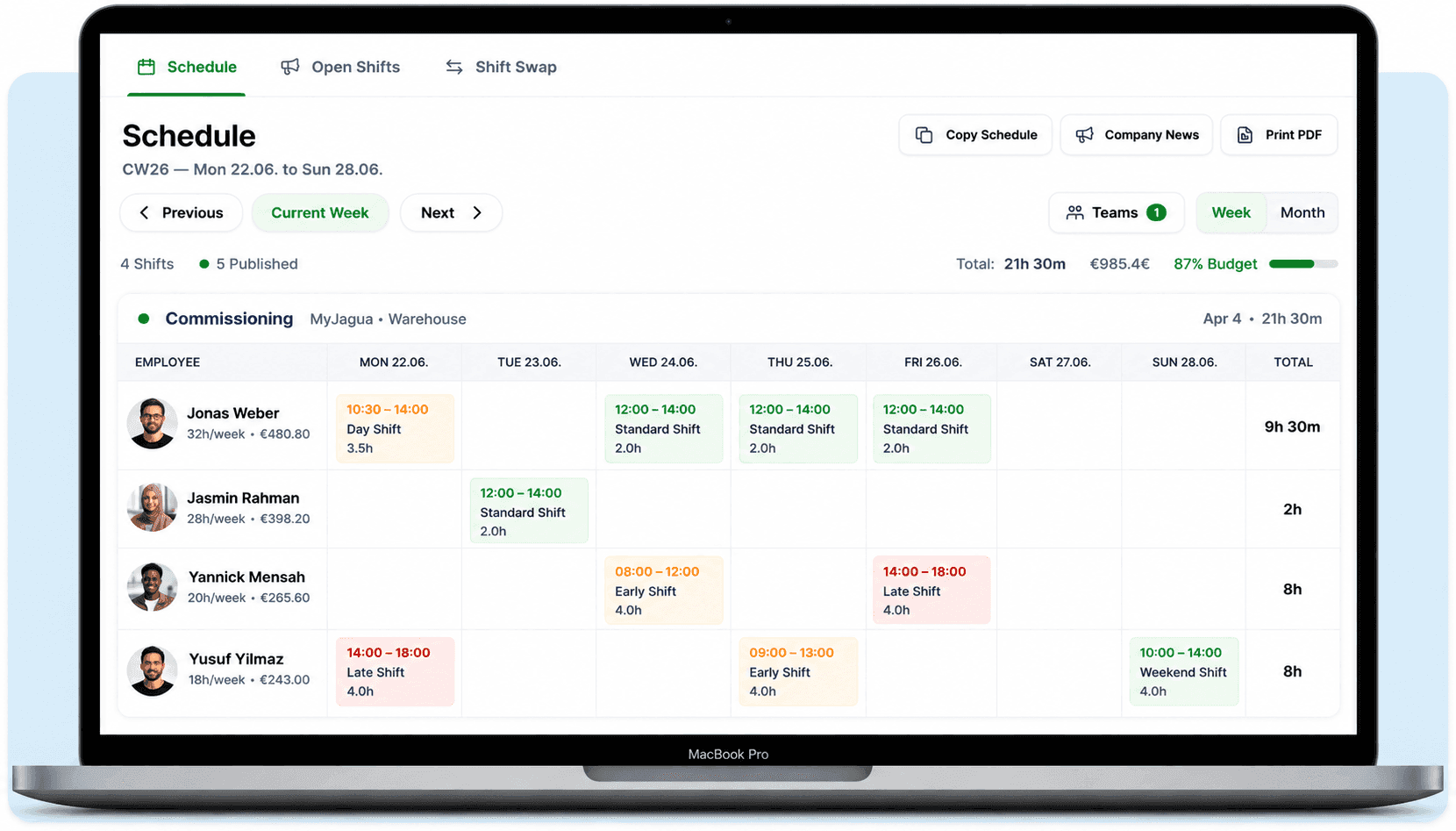
The schedule is only the beginning. The dashboard shows planned hours, current absences and key figures without reconciling several spreadsheets.
One connected workflow
The greatest benefit comes not from a digital calendar alone but from connecting the individual steps. Information is entered once and remains available for the next part of the process.
Planners start with the shifts that need coverage, stored working models and known absences. Instead of opening several lists side by side, they work from one planning basis. Unfilled shifts remain visible until a suitable assignment is found.
Explore online planningCoverage and alerts can be reviewed before approval. Once published, the team sees the current version in the app or browser. Changes replace the previous version so several screenshots or printouts do not circulate at the same time.
Explore the employee appEmployees record start, end and breaks through the enabled channel. Because scheduling and time tracking share one system, planners can compare planned and actual hours without moving values between separate files.
Compare time trackingHours, absences and relevant balances are brought together in a structured form. This does not run payroll, but it reduces manual preparation and provides a traceable basis for exports or cooperation with a payroll office or accountant.
Check integrationsA basic app digitizes the noticeboard. An integrated workforce system connects decisions before publication with actual working time afterwards. During a trial, test not only how quickly a shift is created but also how leave, changes, time tracking and month-end work together.
A long feature list says little about daily work. Check whether the solution actually covers your recurring planning problems.
Copy weeks, use shift templates and distribute changes without new spreadsheets. This saves time for recurring patterns.
Good software flags possible conflicts around rest periods, breaks and working time. The business remains responsible for a compliant schedule.
Timer, browser and tablet terminal should use the same data so planned shifts and actual hours can be compared.
Approved leave and other absences need to be visible during planning. This reduces double-booking and later corrections.
Employees should see the current schedule and request leave or shift swaps digitally without private chat groups.
Look for a DPA, roles and permissions, encryption, traceable access, and a transparent EU server location.
The right solution does not depend on headcount alone. Rotating working hours and coordination effort are usually more important.
Employee scheduling software is a digital application for planning work and shift times, assigning people and publishing the finished schedule. Unlike a static spreadsheet, it can consider availability, absences and changes centrally. Employees access the current version through a browser or app.
Broader systems go beyond the calendar by connecting scheduling with time tracking, time accounts, leave management and payroll preparation. Data does not need to be transferred repeatedly: approved leave is visible while planning, published shifts provide context for time tracking, and planned and actual hours can be compared.
The terms overlap but describe different search intentions: people who want to create a schedule online often need the direct planning workflow. A shift planner.
Implementation does not need to become a months-long IT project. A small or medium team can prepare its first schedule in a clear sequence and test it together.
Add employees, locations and departments. Assign roles so planners and employees only see what they need.
Define contract types, weekly hours and recurring shift times. Map the current process before changing it.
Start with a realistic week, assign shifts and review alerts. Save recurring patterns as templates.
Use a small internal group to test time tracking, leave requests and schedule changes. Verify settings and permissions.
Inform the whole team, name one contact person and ask specifically about unclear workflows after the first week.
Cost usually depends on team size and features. Shiftdesk starts at €25 per month plus VAT and can be tested for 14 days without a credit card. Compare setup, support and included functions as well as price.
per month · 6 employees included
per month · 12 employees included
per month · 30 employees included
All prices exclude VAT · Cancel anytime · No credit card required
Choose the direct planning workflow, shift models, time tracking, employee app, a free template, or the detailed comparison.
From an empty calendar to a published weekly schedule.
Learn moreOrganize early, late, night and other shift models.
Learn moreRecord working time through app, browser or tablet terminal.
Learn moreKeep schedules, requests and changes available on the go.
Learn moreAn Excel template for small teams and a simple start.
Learn moreCompare benefits, costs and the typical time to switch.
Learn moreOrganize kitchen, floor, peak hours, casual staff and time tracking together.
Learn moreOrganize peak hours, part-time, Minijob staff and multiple stores.
Learn moreStart your 14-day free trial now — free and no credit card required. Or book a personal demo.