Demand
How many people are required for each shift or task?
Staff planning software
Plan more than shifts: bring availability, absences, skills, minimum staffing, locations and scheduled hours into one transparent staffing workflow.
No credit card · Cancel anytime · Hosted in Frankfurt
Planning cockpit
Warehouse team · Week 32
Planning inputs
3 / 3
Staffing met
3 / 3
Staffing met
2 / 3
1 person missing
Open
Applications open
Staffing
1 gap open
Review minimum staffing
Weekly budget
78% planned
Enterprise feature
Working time
1 notice
Review before publishing
Definition and purpose
Staff planning assigns available employees to the right tasks, times and locations. The goal is a workable plan that connects your defined staffing demand with availability, skills and operational constraints.
From planning inputs to a workable staffing plan
How many people are required for each shift or task?
Who is available, not absent and suitably skilled?
Which hours, locations, teams and notices matter?
Who covers which assignment, and when is it published?
Shiftdesk brings the information together and makes gaps visible. Your business continues to define demand and make the final staffing decision.
Shiftdesk does not produce an automatic demand forecast or make staffing decisions instead of the responsible planner.
Clear distinction
These terms are often used interchangeably. Separating them makes software selection much clearer.
Four planning dimensions
A plan becomes workable only when quantity, capability, timing and location align.
How many people?
Make minimum staffing visible per shift and spot understaffing before publishing.
With which skills?
Maintain skill tags and filter suitable employees while creating a shift.
When available?
View availability, absences, planned hours and working-time notices together.
Where and in which team?
Organise locations, departments and teams without maintaining parallel lists.
The planning workflow
A clear workflow prevents information from getting lost across spreadsheets, chat, paper and individual memory.
Maintain locations, teams, contracted hours, skills and recurring shift templates once.
Create shifts and minimum staffing from the demand established by your business.
See absences and employee-maintained availability before assigning anyone.
Assign suitable people by drag and drop and make open gaps explicit.
Review working-time notices, planned hours and, depending on plan, staff cost budgets before release.
Carry open-shift applications, swap requests and recorded hours into the next cycle.
Real product views
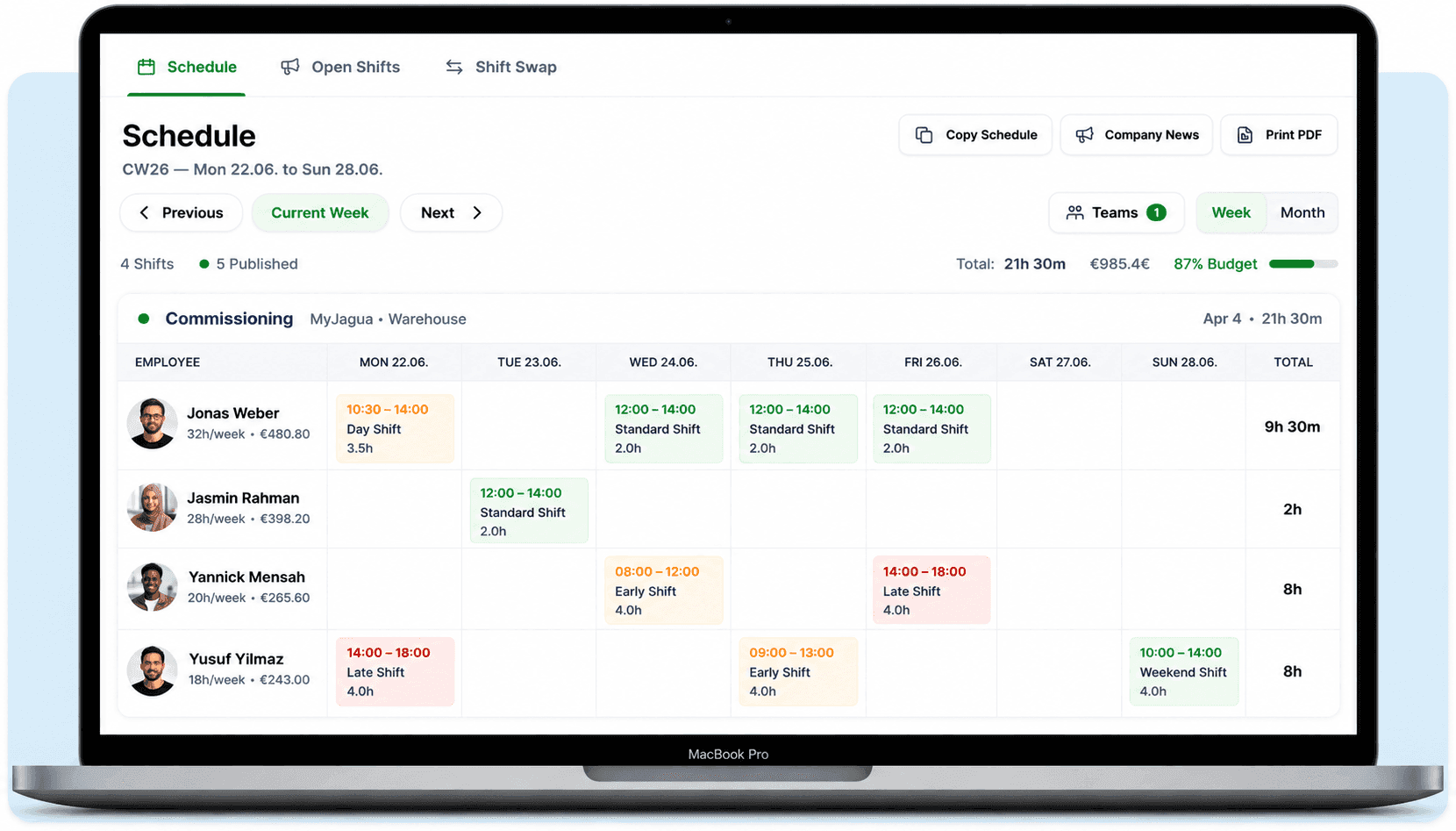
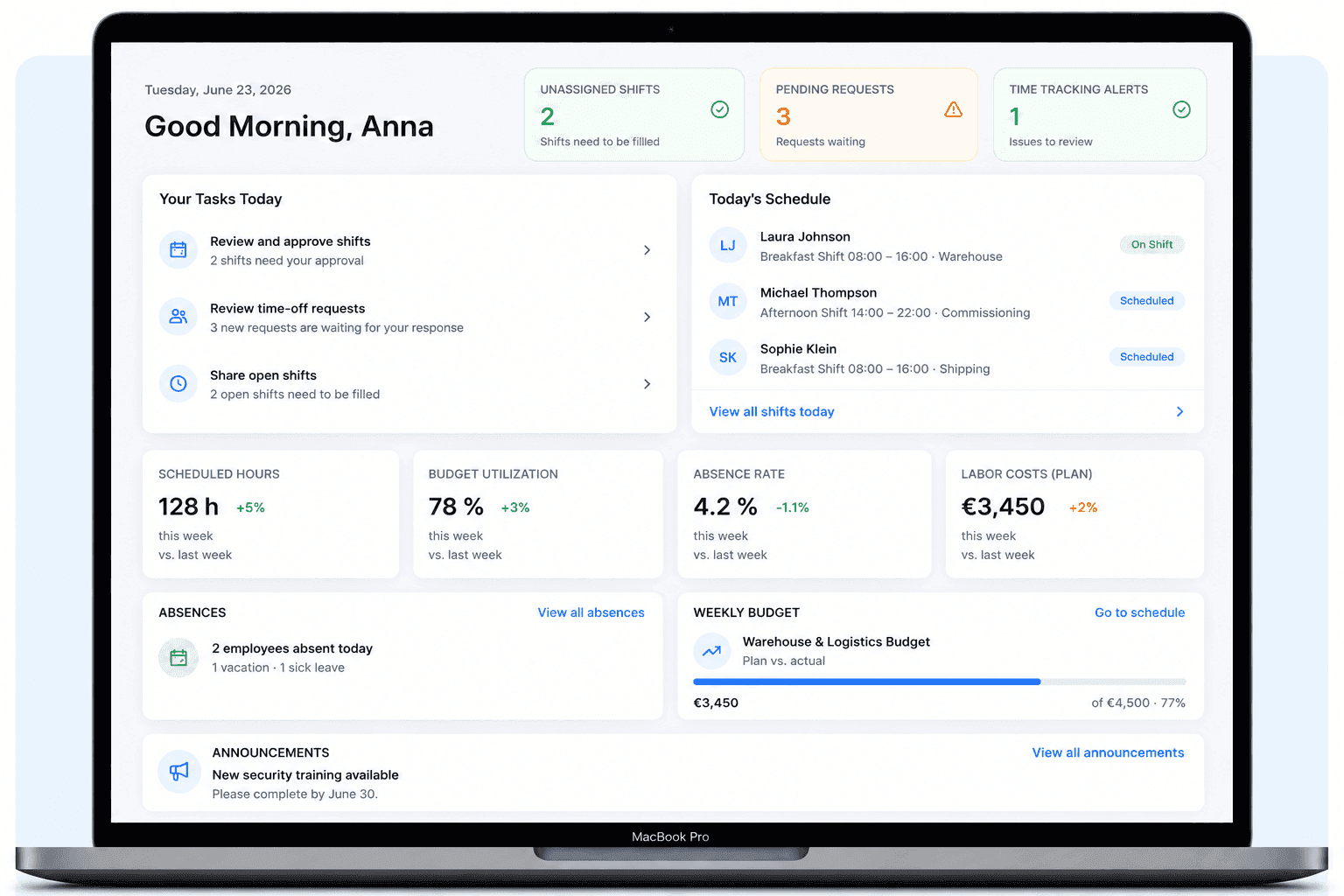
No invented interface: the following views show the actual Shiftdesk schedule and dashboard.
The weekly plan shows employees, shifts, scheduled hours and staff costs together. Templates and copied weeks reduce repetitive input.
The dashboard brings open shifts, requests, absences, planned hours and notices together, giving planners a clear starting point instead of multiple lists.
Planning factors in one system
Shiftdesk brings relevant planning data into one place. Responsible planners retain the decision and can understand every step.
Employees maintain possible working times; planners see them in the schedule.
Approved leave and other absences are visible in the planning context.
Scheduled hours can be compared with the employee's stored scope.
Skill tags help filter people who may fit a task.
Each shift shows whether its defined staffing number has been met.
Employees can apply; depending on the workflow, planning decides who is assigned.
Notices on duration, breaks and rest periods support review before publishing.
Enterprise customers can view weekly limits and planning progress by area.
Connect plan and actuals
The published plan becomes the basis for communication and time tracking. Deviations provide context for the next planning cycle.
Shiftdesk supports this cycle; automatic demand forecasting or cost optimisation is not included.
Is Shiftdesk a fit?
Typical use cases
The planning logic stays consistent, while bottlenecks differ by industry.
Coordinate front of house, kitchen and peak times with changing availability.
Plan stores, checkout coverage and seasonal peaks separately.
Keep multi-shift operations, areas and minimum staffing visible.
Make 24/7 duties and qualifications visible in the planning context.
Coordinate sites, deployment locations and changing teams centrally.
Adopt without a major project
Structure locations, departments and teams.
Capture master data, contracted hours and roles.
Add skills, availability, shift templates and minimum staffing.
Mirror the existing process and review it with responsible planners.
Invite the team, collect feedback and refine templates step by step.
Plans
Availability, skills, open shifts and minimum staffing are core capabilities. Budget management is reserved for Enterprise.
per month · 6 employees included
per month · 12 employees included
per month · 30 employees included
All prices exclude VAT · Cancel anytime · No credit card required
Staff planning in practice
A spreadsheet can display a plan, but it does not connect availability, approved absences, open-shift applications and later changes as one workflow. Multiple versions of the same plan quickly emerge.
Central software creates a shared source of truth: responsible planners schedule, employees see published changes, and requests stay attached to the relevant assignment.
Not every available person is suitable for every task. Skill tags make required capabilities visible and can be filtered when creating shifts. The responsible manager still assesses suitability and makes the assignment.
Across several locations, devices or work areas, a maintained skills overview prevents important knowledge from living only in individual people's heads.
Minimum staffing answers the quantity question: has the defined number of employees been reached? Working-time notices then support review of duration, breaks and rest periods. Neither replaces individual legal assessment.
Shiftdesk does not universally block responsible planners. Notices remain visible so exceptions can be reviewed and decided consciously.
Operational reality begins after publishing: employees record time, report deviations or request swaps. Connecting planned and actual time reduces transfer work for reporting and payroll preparation.
Shiftdesk is not a complete payroll system. Exports and integrations pass prepared data to downstream systems and responsible specialists.
Frequently asked questions
Related pages
Start your 14-day free trial now — free and no credit card required. Or book a personal demo.