Create your schedule online: planned in minutes, instantly with your team.
Shifts, hours and leave in one system, up and running in 1-3 hours.
No credit card required · Built on GDPR principles
Book a demo- Hosted in Frankfurt (EU)
- Cancel monthly
- 256-bit encryption
See Shiftdesk in action
The modern workforce management platform for companies with shift operations: plan shifts, track time, manage absences, all in one app. A look inside the software you use to manage staff planning online.
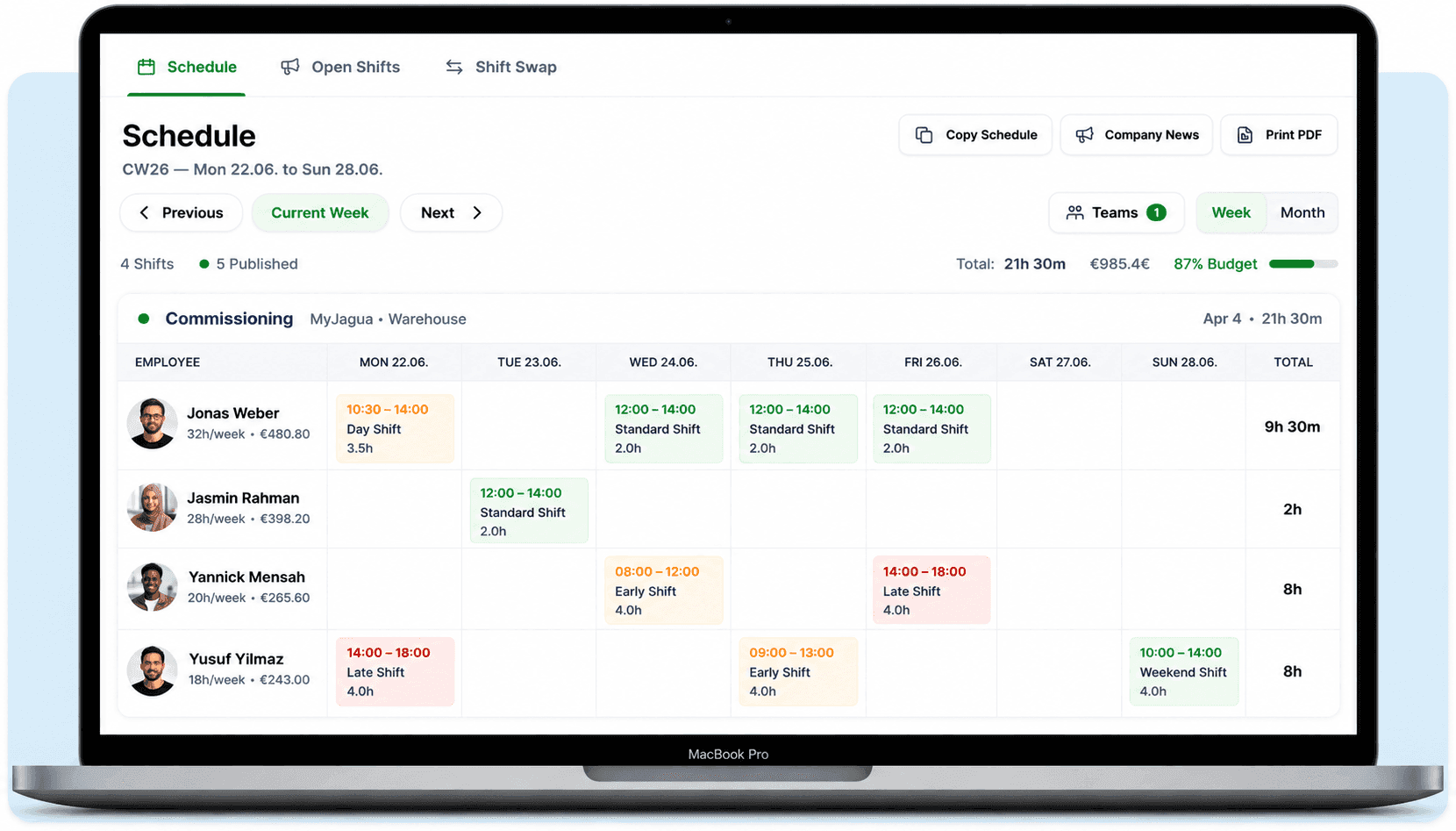
The weekly schedule with drag & drop
Plan entire weeks with drag & drop, assign shifts in seconds and see at a glance where you are still short-staffed. Shiftdesk checks working and rest times against German labour law (ArbZG) as you go.
- Assign shifts via drag & drop and copy whole weeks with one click
- ArbZG alerts on rest periods and maximum working time right in the weekly schedule
- Publish open shifts – employees assign themselves
- Shift templates for recurring patterns instead of planning from scratch each week
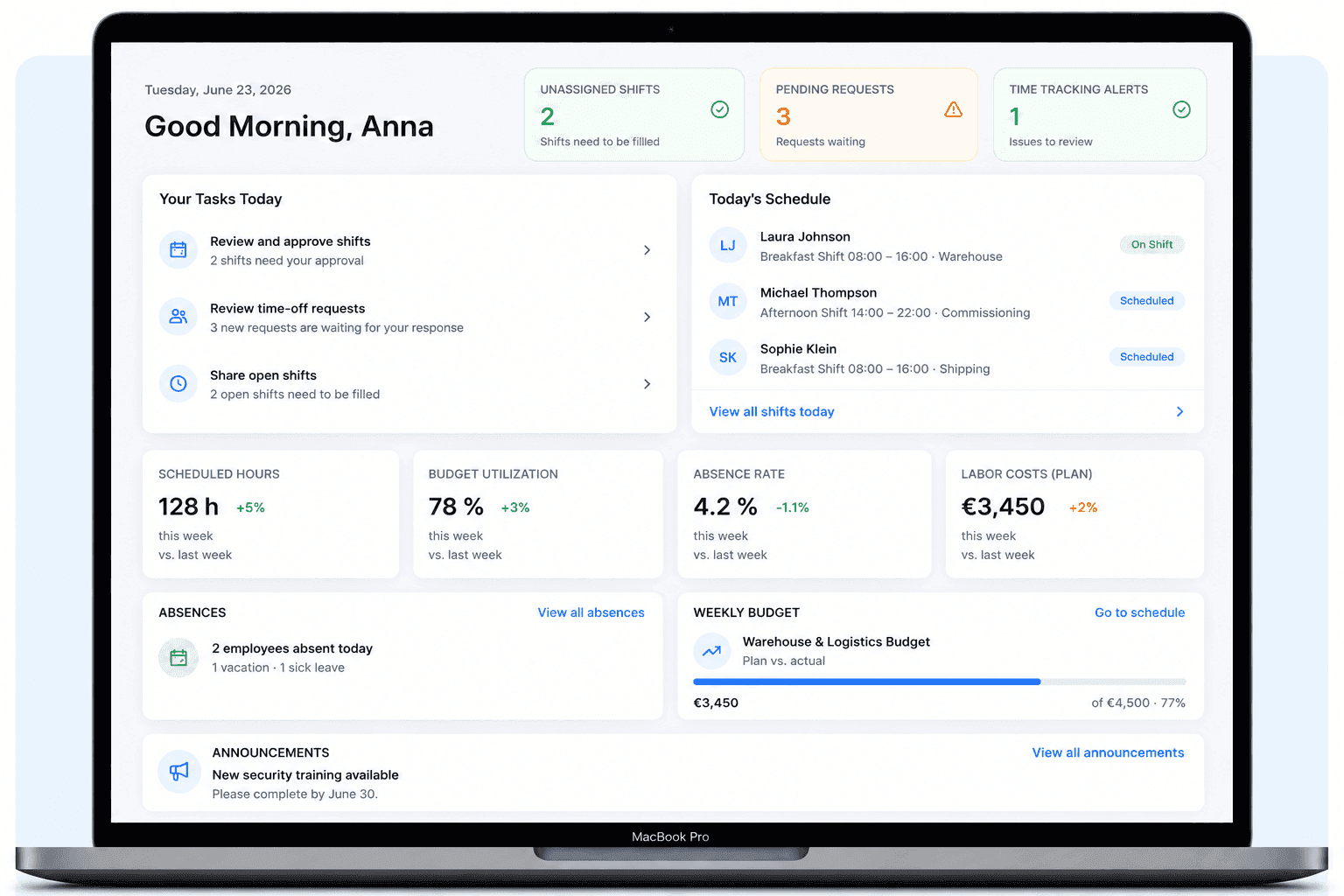
The dashboard for your daily overview
Start the day with every key figure at a glance: scheduled hours, labour costs, absence rate and open tasks – without clicking through spreadsheets.
- Live metrics for scheduled hours, labour costs and absence rate
- Today's absences and upcoming tasks at a glance
- Share announcements with your team straight from the dashboard
- A clear overview of your entire staff planning – on any device
Everything you need for your schedule
From shift scheduling to payroll preparation - Shiftdesk supports the entire planning process.
Drag-and-drop weekly planner
Assign shifts via drag and drop, copy weeks and use templates. The planning adapts to your business.
Real-time ArbZG alerts
Alerts on rest periods, working time and break rules right in the schedule - before the plan is published.
Shift templates & copy function
Create templates for recurring shift patterns. Copy entire weeks with a single click.
Open shifts & self-assignment
Publish unfilled shifts so employees can assign themselves.
Integrated time tracking
Timer or manual entry - with automatic break calculation and hours account.
Absences & leave balance
Manage leave requests, sick notes and special leave digitally. Automatic leave balance.
Simple, transparent pricing
Base fee plus a fair per-employee tier. All prices net, plus VAT.
Basic
per month · 6 employees included
- Shift scheduling with drag and drop
- Time tracking (timer + manual)
- Absences with leave balance
- Up to 3 locations
Pro
per month · 12 employees included
- All Basic features
- Unlimited locations
- Payroll preparation & DATEV
- Tablet time clock (kiosk mode)
Enterprise
per month · 30 employees included
- All Pro features
- Public REST API
- Budget management & custom fields
- SLA support (8-hour response time)
All prices exclude VAT · Cancel anytime · No credit card required
The right solution for every industry
Whether scheduling or shift planning online - requirements vary by industry. Planning in fixed shifts? Go to shift scheduler.

Retail
Opening hours, part-time staff, Saturday planning and seasonal fluctuations.

Restaurants
Kitchen, floor, peak hours, casual staff and last-minute schedule changes.

Care & hospitals
24/7 operations, minimum staffing, qualification requirements and night-shift compliance.

Security & guarding
24/7 site security, long shifts, changing locations and night work.

Hotels
Front desk, housekeeping, kitchen and service - cross-department planning.
What is an online schedule?
An online schedule - also called online shift planning - is browser-based software that lets companies manage their workforce planning digitally. Instead of paper lists, whiteboards or Excel spreadsheets, managers handle shift assignment in one central application. Employees see their schedule in real time, and changes become visible instantly.
The difference from a simple scheduling app lies in the feature set: a modern online scheduler covers not only shift assignment but also time tracking, absence management, ArbZG alerts and often a connection to payroll preparation.
Since the German Federal Labour Court ruling of September 2022, employers in Germany are generally required to systematically record their employees' working hours. Even though the exact statutory framework is still pending, many companies are already turning to digital solutions to be prepared. An online schedule that combines shift scheduling and time tracking in one system can provide a solid foundation here - both for documentation and for day-to-day planning. Read more in our article on the time tracking obligation 2026.
Why companies create their schedule online
Significantly less planning effort
Imagine planning a team of 15 employees across part-time, full-time and Minijob arrangements. With Excel that means: requesting availability manually every week, calculating hours, checking for conflicts. With an online schedule you do this in a fraction of the time - via drag and drop, with templates and automatic alerts.
Automatic conflict detection
Specialized software can flag potential conflicts: rest period too short, break rule not met, Minijob limit exceeded. With Excel such errors go unnoticed - with potential consequences for the business. Especially in industries with strict requirements like care or hospitality, this makes a big difference.
Real-time updates instead of WhatsApp chaos
When a shift is swapped, everyone involved sees the current status immediately. No forwarding screenshots, no outdated printouts in the break room. This cuts communication overhead, prevents misunderstandings and ensures everyone knows who's working come Monday morning.
ArbZG alerts as support
The German Working Hours Act (ArbZG) sets out rest periods, breaks and maximum working hours, among other things. An online shift scheduler can display alerts on these rules and thereby help build a cleaner plan from the start. This does not replace a legal review, but it helps in everyday work.
Read more in our guide to rest periods and breaks.
Which industries is an online schedule suited for?
Hospitality: Peak times that change daily, split shifts, a high share of Minijob workers and spontaneous plan changes - hospitality is one of the most demanding industries for scheduling. An online schedule helps you keep an overview and stay on top of Minijob limits. Read more in the hospitality scheduling article.
Care & hospitals: 24/7 operations require seamless planning with early, late and night shifts. On top of that come minimum staffing requirements, qualification rules and strict rest-period regulations. A digital shift scheduler can help make this complexity manageable. Read more under Care & hospitals.
Retail: Changing opening hours, many part-time staff, seasonal peaks and store planning - retail needs flexible shift models. An online schedule enables cross-location planning and helps coordinate leave. Read more under Retail.
Security & guarding: Round-the-clock site security, changing locations, short-notice event assignments and night shifts - security services need planning that can handle complexity. Read more under Security.
Hotels & events: Changing occupancy, seasonal peaks and short-notice staffing adjustments make the hotel industry a particularly planning-intensive sector. Front desk, housekeeping, kitchen and service each have their own shift patterns - an online schedule helps coordinate all areas in one overview and respond quickly to booking peaks. Read more under Hotels.
Online schedule vs. Excel: when is it worth switching?
For 1-3 employees with fixed hours, Excel can certainly suffice (our free schedule template helps you get started). As soon as requirements grow, the differences show:
| Criterion | Excel | Online schedule |
|---|---|---|
| Plan changes | Manual, error-prone | Drag and drop, instantly visible |
| ArbZG alerts | None | Automatic alerts |
| Minijob limits | Check manually | Alerts as you approach the limit |
| Absences | Separate spreadsheet | Integrated (leave, sick) |
| Hours account | Custom formulas needed | Automatic target/actual comparison |
| Team access | Via email / notice board | App or browser, anytime |
| Setup | Instant (template) | 1-3 hours, one time |
| Cost | €0 in extra costs | from €25/month plus VAT |
The table shows: Excel isn't a bad tool - but it wasn't built to coordinate teams. Anyone who regularly plans shifts, polls availability and has to document working hours quickly hits the limits of a spreadsheet. The typical warning signs: you spend more time maintaining the plan than actually planning. Changes go back and forth via WhatsApp, with no clarity on which version is current. And at month-end hours are missing because no one kept an eye on the target/actual variance. If that sounds familiar, the time has come to switch to an online schedule.
Detailed comparison: Schedule with Excel or software?
Comparing different solutions? See the employee scheduling software selection guide.
Create your schedule online: here's how
In 5 steps from an empty calendar to a finished weekly plan:
Add employees
Record master data, contract type (full-time, part-time, Minijob) and weekly hours.
Define your shift model
Set up shift types: early, late, night, day. Define times and minimum staffing.
Create the weekly plan
Drag shifts onto the calendar and assign employees. Use templates for recurring weeks.
Review alerts and publish the plan
Review ArbZG alerts (rest periods, working time). Resolve any conflicts.
Notify the team
Publish the plan - via app or email. All employees see their schedule instantly.
You'll find an even more detailed guide with 7 steps, shift models and a checklist on the blog: Creating a schedule: the complete guide.
Frequently asked questions about online schedules
What is an online schedule?▼
Can I create a schedule online for free?▼
What are the advantages of a digital schedule over Excel?▼
What should I consider regarding data protection for an online schedule?▼
How long does it take to set up an online scheduler?▼
Do I have to comply with the Working Hours Act with an online schedule?▼
Which industries is an online schedule suited for?▼
Does an online schedule help with the 2026 time-tracking obligation?▼
Online schedule vs. notice board or WhatsApp — what's the difference?▼
Ready for better shift scheduling?
Start your 14-day free trial now — free and no credit card required. Or book a personal demo.