Industry solution
Scheduling & workforce planning for retail
Shifts, peak hours and stores in one reliable schedule.
No credit card required · Built on GDPR principles
Book a demo- Hosted in Frankfurt (EU)
- Cancel monthly
- 256-bit encryption

Shiftdesk connects scheduling, workforce planning and time tracking for retail. Organize opening hours, Saturdays, part-time staff and short-notice absences from a single store to a multi-store operation — without competing versions in Excel, on a notice board and in chat.
* Informational notes based on statutory default values. Not legal advice. Collective-bargaining, company-specific and industry-specific special rules must be reviewed on your own responsibility.
Why retail workforce planning becomes complex
Every business knows these problems — Shiftdesk solves them digitally.
Opening and peak hours
Staffing needs change throughout the day, while tills, customer service and the shop floor still need sensible coverage.
Part-time, Minijob and availability
Different weekly hours, days off and availability turn every schedule into a new balancing exercise.
Saturdays and seasonal peaks
Campaign days, Christmas trading, stocktakes and clearance sales need more staff than a typical weekday.
Short-notice absences
When someone is absent, the store manager needs to find cover quickly and make the new schedule clear to everyone affected.
Multiple stores
Without a shared view, it is often unclear whether an available employee from another store can help.
Schedule, actual time and payroll prep
When scheduling and time tracking are separate, more transfers, questions and corrections are created.
Make peak-hour gaps visible before publishing the schedule
Translate expected staffing needs from your own store data into specific shifts. The schedule shows which periods are covered, where an open shift may be useful and whether an available employee from another store could help.
Derive need from store operations
Opening hours, known footfall, campaigns and minimum coverage form the starting point.
Plan gaps as open shifts
Uncovered periods are handled in the schedule instead of being hidden in a separate list.
Involve the team and other stores
Available employees can be asked and assigned to the current schedule after approval.
City center store
Uncovered periods are handled in the schedule instead of being hidden in a separate list.
Available employees can be asked and assigned to the current schedule after approval.
Schematic planning workflow. Shiftdesk does not generate automatic sales or staffing forecasts; the responsible planner defines need using the business's own data.
How Shiftdesk supports day-to-day store operations
Shift templates for sales teams
Create recurring early, late and Saturday shifts, copy proven weeks and adapt them for campaigns or holiday periods.
Time account per employee
Compare scheduled and recorded time. Overtime, deficits and the current balance remain traceable for part-time and Minijob staff.
Leave and absences in one place
Employees submit requests digitally. Planners see absences in the same system and can protect sensitive weeks with leave blocks (from the Pro plan).
Working-time rule notices
While planning, Shiftdesk flags potential conflicts involving maximum working time, rest periods and breaks based on standard ArbZG values.
Organize across stores
Manage locations on one platform and, where appropriate, schedule eligible employees in another store.
Prepare time for payroll
Evaluate working time, account for premiums and hourly rates, and hand data to payroll preparation through DATEV export.
How many hours fit into a Minijob at your current hourly wage? Calculate it for free: Open the Minijob hours calculator
Simple, transparent pricing
A base fee plus a fair per-employee tier. All prices net, plus VAT.
Basic
per month · 6 employees included
- Shift scheduling with drag and drop
- Time tracking (timer + manual)
- Absences with leave balance
- Up to 3 locations
Pro
per month · 12 employees included
- All Basic features
- Unlimited locations
- Payroll preparation & DATEV
- Tablet time clock (kiosk mode)
Enterprise
per month · 30 employees included
- All Pro features
- Public REST API
- Budget management & custom fields
- SLA support (8-hour response time)
All prices exclude VAT · Cancel anytime · No credit card required

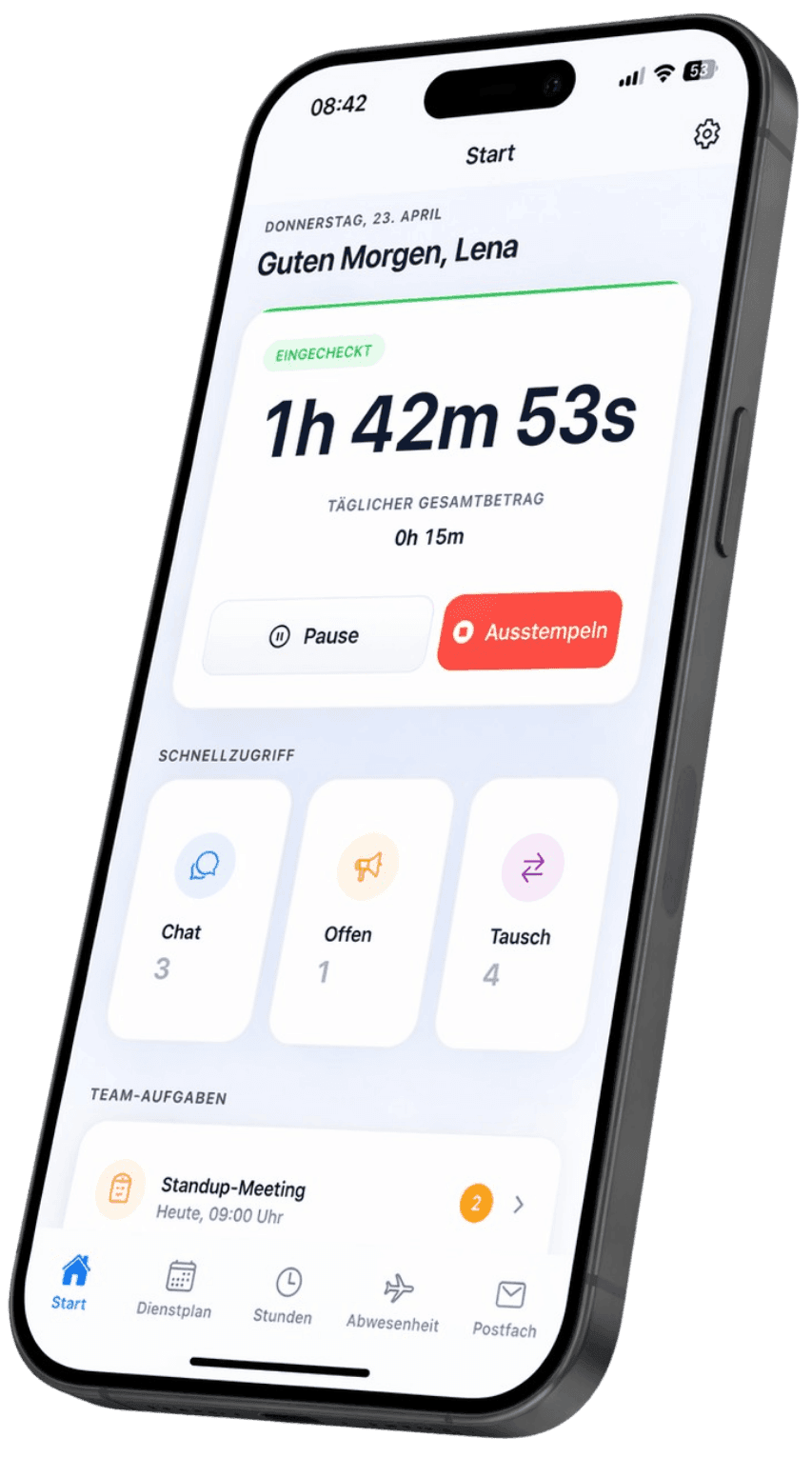
The current schedule goes straight to the phone
Employees see published shifts, changes and requests in the app — without photographing the notice board or juggling versions in a WhatsApp group.
Request shift swaps transparently
Employees start a swap digitally. The store manager keeps approval and the binding schedule version in view.
See changes in real time
New shifts, schedule changes and open duties appear on the approved version, including on the go.
Download for free — now on the App Store and Google Play


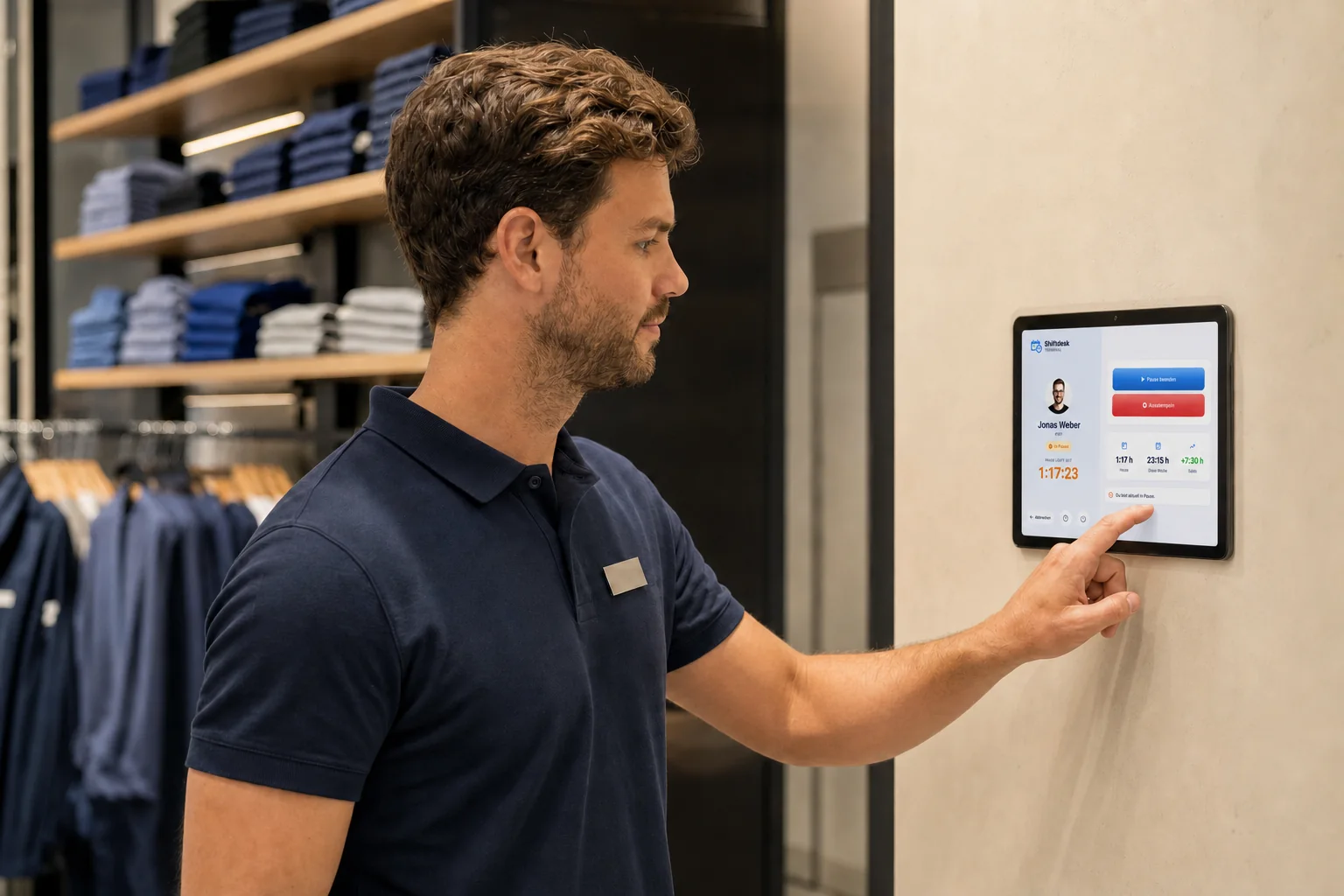
Tablet time clock for the stockroom or staff area
Record clock-in, clock-out and breaks right at the location, so not every casual worker needs a private smartphone for time tracking.
Clock in with a personal PIN
Employees select their name, confirm the PIN and record time on the assigned terminal.
Made for a fixed store location
The tablet can be assigned to a location, locked to a single app and reconnect automatically after a network interruption.
Get it now — on the App Store and Google Play
What does workforce planning mean in retail?
Retail workforce planning turns the expected workload of a store into specific coverage: who works when, at which location and in which area? Unlike a simple calendar, a useful schedule also considers agreed weekly hours, availability, absences and whether opening hours are covered by the intended team.
Staffing need is not generated automatically by the software. The responsible store or area manager derives it from the business's own data and experience, such as opening hours, footfall, deliveries, service priorities, campaigns or a stocktake. Shiftdesk then helps organize that need as shifts, publish changes and manage scheduled and actual time in one place.
Plan peak hours, tills and the shop floor together
A busy Saturday often needs different coverage from a quiet Monday morning. Instead of applying the same template every day, combine early, mid and late shifts so handovers and known peaks are covered. Whether fixed skills or departments must also be considered remains an operational decision for the business.
Make part-time and Minijob work plannable
Retail teams often combine full-time, part-time, student and Minijob employees. Store weekly hours and available periods so the employee's personal time frame stays visible alongside the open shift. The time account supports ongoing comparison; binding legal and payroll assessment remains with the employer and its payroll adviser.
Single store and multi-store operations
A single store primarily needs one reliable schedule version and fast communication. Multiple locations add a shared resource question: which employee may and can help in another store? A central platform provides visibility without removing each store manager's responsibility.
Notice board, Excel or retail scheduling software?
A paper schedule or basic spreadsheet can be sufficient for a small, stable team. The problem usually appears not in the first version but when things change: an absence, swap request or rescheduled delivery quickly creates competing versions. The store manager then has to determine who has seen the latest plan and which hours need to be transferred to payroll later.
Scheduling software is particularly useful when changes are regular, several absence lists run in parallel or scheduling and time tracking need to connect. The comparison below outlines typical process differences; it is not a blanket assessment for every business.
| Criterion | Paper notice | Excel file | Shiftdesk |
|---|---|---|---|
| Current schedule | Only visible at the notice board | Depends on file and distribution | Published version in app and browser |
| Short-notice change | Reprint or edit by hand | Edit and redistribute the file | Change the schedule and publish digitally |
| Swap and leave requests | Verbal or separate list | Usually outside the file | Digital request with approval workflow |
| Time account | Maintained separately | Formulas and upkeep required | Scheduled and actual time in one system |
| Multiple stores | Separate notices | Several files or worksheets | Organize locations on one platform |
| Payroll preparation | Transfer times | Prepare data manually | Prepare reports and DATEV export |
Connect retail scheduling and time tracking
The schedule shows intended working time, while time tracking records time actually worked. When both areas are managed separately, differences have to be reconciled manually. Shiftdesk keeps shifts, recorded times and time accounts on the same platform. This supports follow-up and payroll preparation but does not run payroll itself.
Depending on the workflow, the team can record time through the app, browser or tablet terminal. The PIN-based tablet time clock is intended for shared store devices. The appropriate method depends on permitted devices, location setup and applicable works agreements.
Working-time notices are not legal advice
While planning, Shiftdesk can flag potential conflicts involving maximum working time, rest periods and breaks based on configured standard ArbZG values. These notices support review but do not guarantee legal compliance. Collective agreements, exceptions, youth-employment rules and operational specifics must be reviewed by the responsible people.
From actual time to payroll preparation
After review and approval, working time can be evaluated and exported for further processing. Premiums and different hourly rates can be included in preparation. Final payroll, tax review and payment remain in the responsible payroll system or with the payroll team.
How to introduce digital workforce planning in a store
Start with a typical week rather than a theoretical ideal. Set up locations, roles, contractual hours and the shift times actually used. Then plan with a small group, verify permissions and notifications, and only then publish to the entire team.
Multi-store businesses benefit from one standard for shift names, approvals and cover. At the same time, store managers should only see and edit the areas for which they are responsible. After the first complete payroll period, assess which rules, templates and exports still need adjustment.
Example: prepare a campaign Saturday without schedule chaos
This is how a store manager can translate known additional need into a binding schedule in a structured way.
- 1
Define internal staffing need
The store manager assesses opening hours, the planned campaign, expected footfall and required areas using the business's own data.
- 2
Match the core team and availability
Contracted hours, days off and approved absences are checked before assigning shifts.
- 3
Keep uncovered periods visible
The uncovered lunchtime peak remains an open shift in the schedule instead of being hidden in a separate note.
- 4
Schedule suitable cover
An available employee from the team or another store is asked and assigned after approval.
- 5
Publish and review actual time
The team receives the binding schedule digitally. After the shift, differences are reviewed in time tracking.
Fictitious process example for illustration, not a customer reference or a promise of automatic staffing forecasts.
Frequently asked questions
What is workforce planning in retail?
Is Shiftdesk suitable for single stores and multi-store businesses?
Does Shiftdesk automatically create staffing forecasts?
How can part-time and Minijob staff be scheduled?
Does Shiftdesk check working time under ArbZG?
Can employees view their schedule in an app?
Does every casual worker need a smartphone for time tracking?
Can Shiftdesk run retail payroll?
How quickly can a store start with Shiftdesk?
Discover all features
Ready for better shift scheduling?
Start your 14-day free trial now — free and no credit card required. Or book a personal demo.