Employees
Employees can view and manage their own requests while the status allows it. Requests using another employee ID or a different tenant are not returned.
Access: own requests and own leave balance
Absence management for shift-based businesses
Request, decide and account for leave, sickness and other absences digitally — with a transparent leave balance and access controls that match each role.
No credit card required · Set up without an IT project
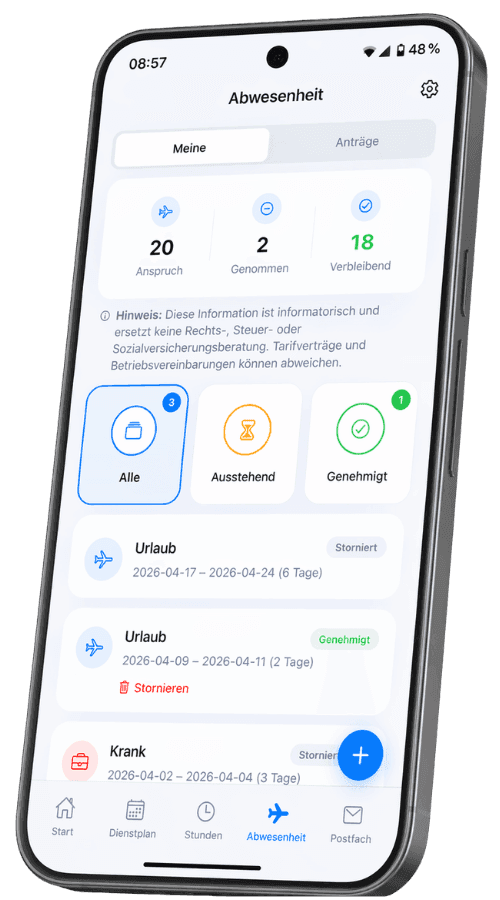
One request, three perspectives
Absence management only becomes useful when employees, managers and planners work from the same information. Shiftdesk connects those steps in one clear flow.
Leave, sickness, unpaid leave, special leave or another absence is recorded in the app or browser with a date range and optional note. Employees can see their own current status.
Pending leave requests can be approved or rejected within the permitted organisational scope. Dates, overlaps and configured leave blackout periods are checked first.
Approved absences are available to scheduling and the leave balance. Planners can avoid assigning people who are away during the relevant period.
Shiftdesk does not make case-specific employment-law decisions. Entitlements, special rules and internal policies are defined by the business; the software makes the configured process transparent.
A traceable workflow
Every step has a clear status. This reduces follow-up questions and keeps the request, decision and schedule from drifting apart in separate files.
The absence type, date range and an optional note are submitted digitally.
Overlaps, locked periods and relevant leave blackout periods are checked.
Authorised roles approve or reject a pending leave request.
Approved date ranges become available as absences in the scheduling context.
Approved or cancelled leave days are reflected in the employee's leave balance.
Schematic process view — not an invented product interface. The visible screenshots on this page come from Shiftdesk.
Connected to shift scheduling
An isolated leave list does not solve a staffing gap. Shiftdesk connects approved absences with the scheduling context and keeps requests, status and leave balances in one central system.
Absence types are intentionally predefined. Custom categories and multi-stage approval chains are not currently part of the product.
Explore staff scheduling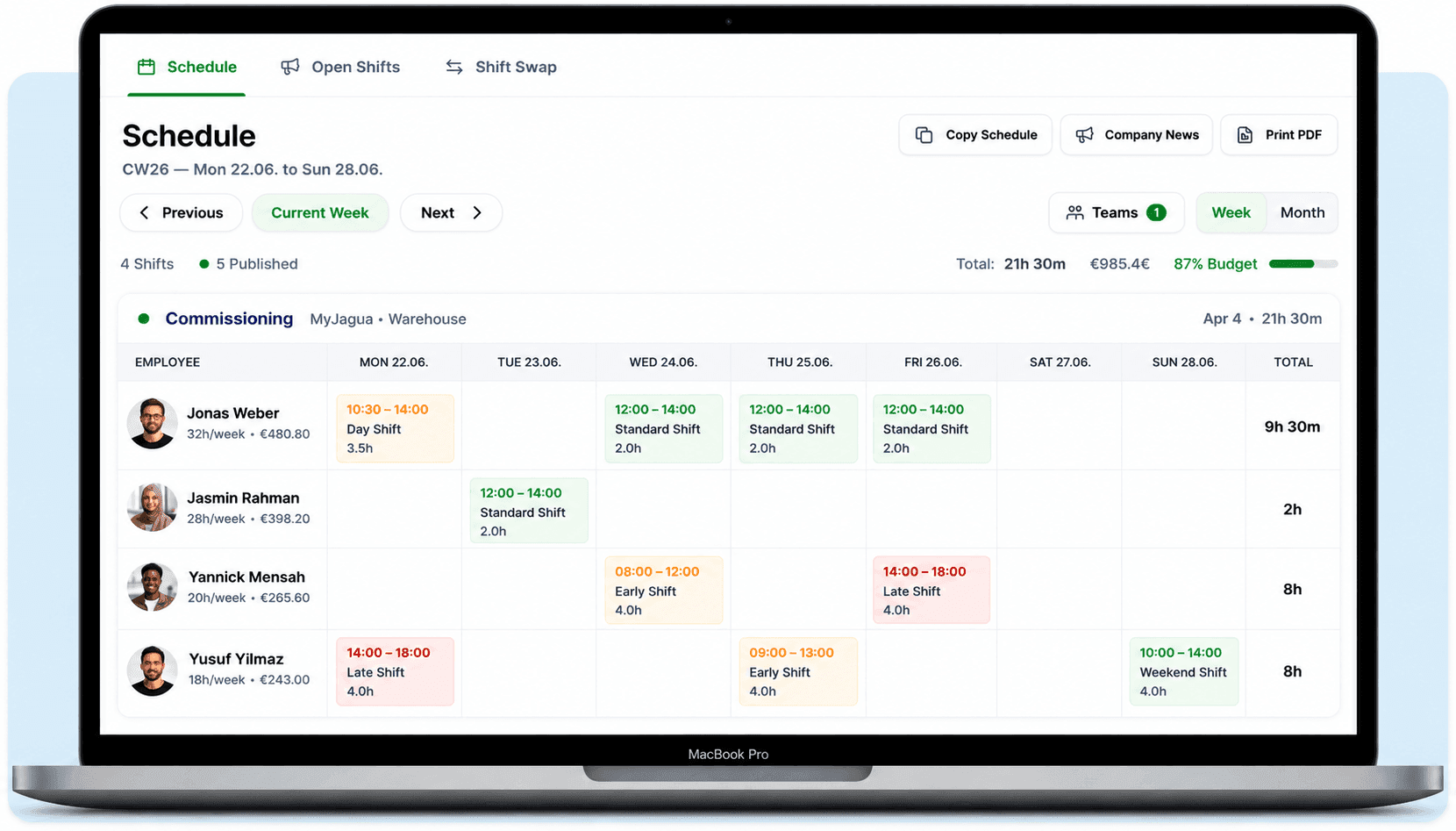
Privacy by role
Absence information can be sensitive. Shiftdesk limits visibility and actions by role and organisational scope instead of distributing every detail across the company.
Employees can view and manage their own requests while the status allows it. Requests using another employee ID or a different tenant are not returned.
Access: own requests and own leave balance
Location managers work only within their assigned location. Sensitive absence types and notes are reduced to a general absence outside the authorised HR and admin roles.
Access: assigned location, reduced sensitive details
Owners and HR can manage absences across the tenant within the intended administrative process and see the details required for their responsibilities.
Access: tenant-wide administrative scope
Specific permissions depend on the configured role and organisational assignment. Shiftdesk does not replace a business's internal privacy and access-control policy.
Transparent leave balance
The leave balance shows the annual entitlement entered by the business, carryover, additional days, approved leave and the remaining balance. Approvals and cancellations consistently update the used portion.
Shiftdesk does not automatically determine every statutory, collective-agreement or contractual exception. The business enters the entitlement based on its rules, and the software manages it transparently from there.
Calculate leave entitlement for freeExample of a configured leave balance
Remaining leave
21 days
Practical leave controls
Inventory, peak season or a planned major event can limit staffing capacity. Leave blackout periods make those constraints visible while the request is being submitted.
The request is blocked for the relevant period. A blackout can apply specifically to a location, department or team so that the entire company is not restricted unnecessarily.
Employees receive a clear warning and must acknowledge it, but can still submit the request. This suits periods that are critical without being completely closed.
Leave blackout periods are an organisational aid. The business remains responsible for assessing whether and under which conditions a restriction is lawful.
Real scenarios, not a feature list
Two employees request the same period off. Responsible managers see the pending request in its organisational context and decide before the approved dates affect planning.
A location-specific hard or soft blackout makes the critical period clear during submission without blocking other locations across the company.
Sickness is recorded as its own absence. Authorised planners can see that the person is away without exposing unnecessary sensitive details to location-level roles.
Excel and email compared
The main benefit is not a prettier calendar. It is one shared source of truth for the request, permission, decision, schedule and leave balance.
Excel / email
Information is spread across inboxes, chat threads and copied spreadsheets.
Shiftdesk
The request and its status stay visible in one central record for authorised people.
Excel / email
Formulas and carryover require manual maintenance and version checks.
Shiftdesk
Entered entitlement, carryover, additional and used days produce a traceable balance.
Excel / email
Approved leave emails have to be transferred separately into the schedule.
Shiftdesk
Approved absences are available in the same system used for staff scheduling.
Excel / email
Shared files are easily distributed too widely or copied to local devices.
Shiftdesk
Role and organisational scope restrict data and actions to the intended area.
Transparent product boundaries
A clear boundary is more helpful than a long list of unrealistic promises.
Adoption without a major project
A successful start depends on clear responsibilities and clean opening balances, not a complicated parallel process.
Locations, departments, teams and responsible roles are configured to match the organisation.
Annual entitlement, carryover, additional and already used leave days are checked and entered.
Employees receive access to the app or browser and learn the short request flow.
A clearly marked test request verifies roles, blackout periods, the decision and the scheduling view.
Plans
Shiftdesk connects leave management with scheduling, time tracking and employee management. The plan overview shows prices and included features transparently.
per month · 6 employees included
per month · 12 employees included
per month · 30 employees included
All prices exclude VAT · Cancel anytime · No credit card required
Absence management software combines requests, decisions, absence periods and leave balances in one shared process. Employees submit a request digitally, authorised managers process it, and the approved absence then becomes available to staff scheduling. The software therefore replaces more than an Excel list: it also reduces manual coordination between employees, planners and HR stakeholders.
This connection is particularly important for shift-based businesses. An approved absence directly affects who can cover an early, late or weekend shift. If the leave list and schedule remain separate, duplicate maintenance, follow-up questions and staffing mistakes are more likely. Shiftdesk therefore keeps absence management and staff scheduling in the same system without presenting the software as an automatic employment-law decision maker.
Reliable digital leave management requires more than a start and end date. The absence type, current status, organisational scope, configured blackout periods and — for annual leave — the associated balance all matter. Only this combination makes it clear what was requested, approved, rejected or cancelled and how much leave remains.
Before rollout, a business should define who may process requests, which locations or teams each role may see and which information is sensitive. It also needs an agreed opening position for annual entitlement, carryover and leave already taken. Software can apply and display those settings consistently, but it cannot take responsibility for collective-agreement, contractual or statutory exceptions.
| Area | Example | Purpose |
|---|---|---|
| Request | Type, date range, optional note | Clear basis for the record |
| Organisation | Location, department or team | Appropriate visibility and decision scope |
| Leave balance | Entitlement, carryover, additional and used days | Traceable remaining balance |
| Scheduling | Approved absence period | Account for availability in shift planning |
Small and medium-sized businesses rarely need a month-long HR transformation project. A short mobile request path, clear responsibility and a connection to the existing schedule matter more. In hospitality, retail, warehousing, manufacturing and service operations, staffing and working hours often change more frequently than in a conventional office. The value is operational: planners see absences where they assign shifts.
Location and team structures also keep every manager from receiving company-wide access. Shiftdesk limits data based on the assigned role and organisation. Details of sensitive absences are reduced for location-level roles. This supports data minimisation, but the business still has to define its own roles, retention requirements and internal access policies.
When comparing software, look beyond feature lists. Check whether the product merely displays a calendar or whether requests, approval, leave balances and staff scheduling actually work together. Scope and permissions matter too: can a location manager process only their own area? Are sensitive notes shown too widely? Does a cancellation return the balance consistently? These questions often matter more in daily use than the number of decorative dashboards.
Product boundaries should also be explicit. Multi-stage approvals, custom absence types, native calendar or chat integrations and complete payroll are separate product areas. If any of them is essential, establish that before selecting a tool. Shiftdesk focuses on small and medium-sized shift-based businesses that want to connect absence management, scheduling, time tracking and employee management in one clear workforce-management system.
Frequently asked questions
Useful next steps
Connect shifts, availability and staffing in one planning process.
Learn moreConnect working time and the working time account with staff planning.
Learn moreMaintain employee details, contracts, roles and team assignments centrally.
Learn moreCalculate leave for full-time, part-time and mid-year starters.
Learn moreStart your 14-day free trial now — free and no credit card required. Or book a personal demo.