Who belongs to the business under which conditions?
Employee management software
Maintains employee data, contract periods, organisational assignments, roles and qualifications as a shared source of truth.
Employee management software for shift-based businesses
Shiftdesk connects master data, contracts, locations, teams and qualifications with scheduling, time tracking and absences – for small and medium-sized businesses with changing shifts.
No credit card · Hosted in Frankfurt · for Germany, Austria and Switzerland
Employee profile
Yusuf Demir
EMP-004 · Service team lead
Master data
Cologne Old Town
Location and employee number
Contract
Full-time · 26:15 h
Contract type and weekly target
Organisation
Service · Team lead
Department, team and role
Schedule
Time tracking
Absence
Clear scope
The terms are closely related but answer different questions. Shiftdesk deliberately owns the operational core for shift-based businesses.
Who belongs to the business under which conditions?
Maintains employee data, contract periods, organisational assignments, roles and qualifications as a shared source of truth.
Who works when and where?
Assigns available and qualified people to specific shifts, locations and periods.
How is the full HR lifecycle covered?
Depending on the provider, it also covers recruiting, talent management, e-signatures, payroll or performance reviews.
Shiftdesk does not replace a recruiting, talent or payroll suite. Its strength is connecting employee data with day-to-day shift operations.
From joining to leaving
Shiftdesk does not automate an entire HR lifecycle. Its existing steps do keep the operational source of truth for scheduling and time management together.
This flow describes existing Shiftdesk capabilities. It does not replace legal assessments or an individual retention and deletion process.
Record name, contact details, employee number, position, start date and status.
Document contract type, weekly target, hourly wage, leave days and validity.
Set the location, department, team and one of the five fixed roles.
Link an employee account and provide access to the personal app.
Use contract and team data for schedules, time, leave and availability.
Block access when needed; contracts and time data remain available for administration.
Real product view
The employee record brings together general information, employment status and contracts. Further areas connect teams, qualifications and – depending on the plan – documents, individual working-time rules and the hour account.
Sensitive HR documents are not exposed to schedulers or team leads. Plan-dependent areas are visibly labelled as such in Shiftdesk.
View plans and feature scope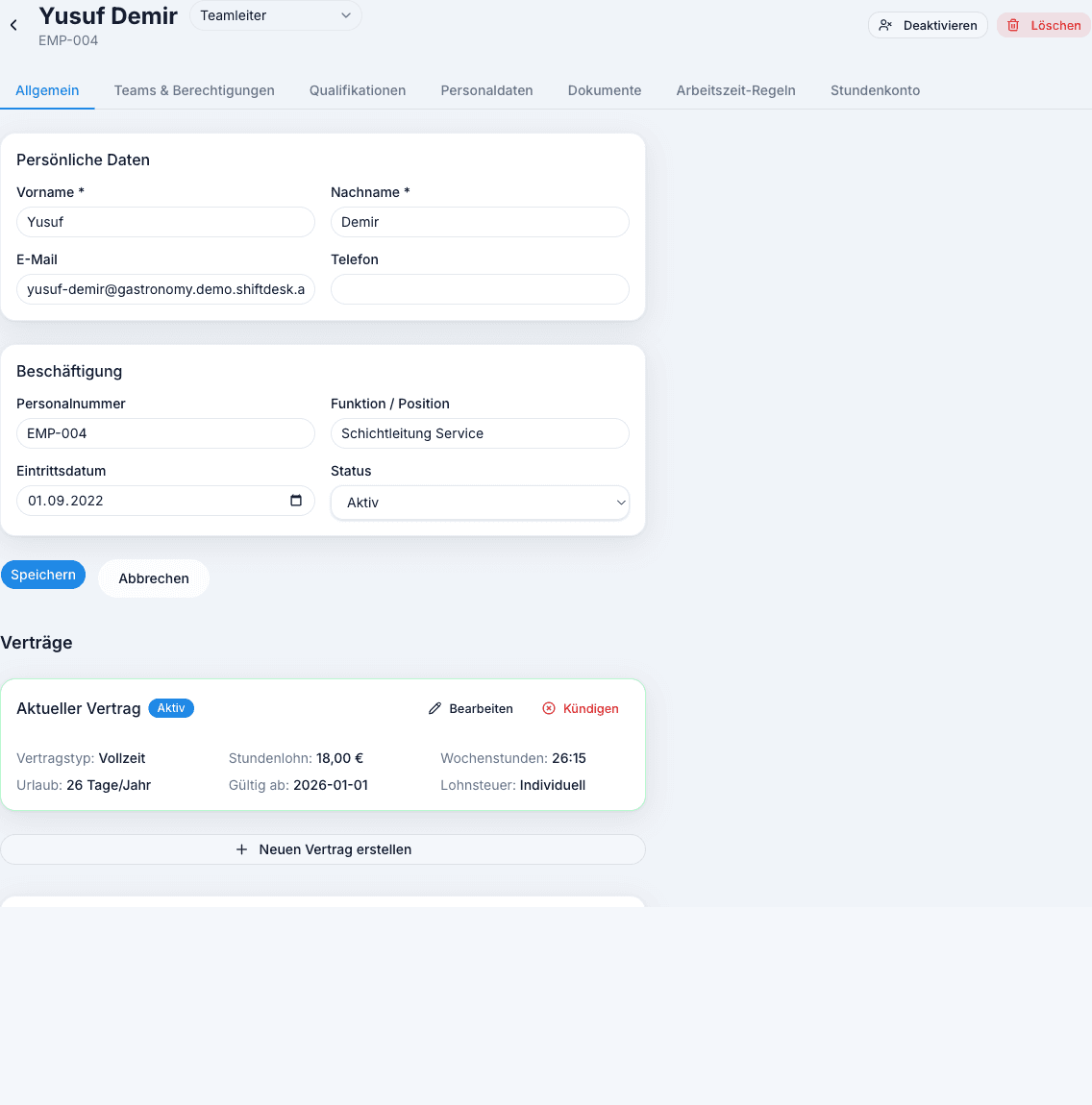
Central source of truth
A good employee record is not defined by collecting as much data as possible, but by keeping current, purpose-bound information in the right place.
Contact details, employee number, position, start date and active, inactive or terminated status form the starting point.
Active and previous contracts remain distinct – including type, validity, weekly target, pay basis and leave days.
The organisational assignment connects the record to the relevant scheduling and responsibility areas.
A linked user account receives a fixed role; employees access their own operational content.
Organisation and access
Together with location and team assignments, the role determines which operational areas can be viewed and edited. Sensitive HR data remains more tightly restricted.
Organisation
Controls the business and has the broadest administrative access.
Organisation
Manages employee data, contracts and sensitive HR areas.
Assigned location
Coordinates operational schedules and requests within the intended location scope.
Assigned team
Works with team-related shifts and operational information within a limited scope.
Own data
Views personal shifts and time and uses requests, availability, swaps and messages.
Shiftdesk uses a fixed role model. It does not claim freely configurable individual permissions or an arbitrarily modelled org chart.
Beyond master data
Some information feeds directly into workforce planning, while other areas require an extended plan because of their sensitivity or depth.
Assign centrally defined skills to a person and optionally add an expiry date.
Store documents by category and add an expiry date when needed; HR access remains restricted.
Set different break and working-time guidance per person; it creates notices, not a legal guarantee.
View target, actual, carryover, corrections and balance when the plus/minus account is enabled for the contract type.
Shiftdesk does not include applicant tracking, e-signatures, talent development or full payroll processing.
Operationally connected
The difference from an isolated employee list appears in daily work: the same organisational foundation is used across several operational workflows.
Location, team, availability, contract and qualifications help place suitable people in the schedule.
Recorded working time is assigned to the correct person and – depending on configuration – to the hour account.
Leave and other absences run through the personal request flow and become visible in scheduling.
Employees view their shifts and time and use leave, availability and shift swaps digitally.
Selection guide
The best solution is not defined by the longest feature list, but by the process that actually needs to be connected.
Suitable for
Very small, stable teams with few changes
Strengths
Limits
Suitable for
End-to-end HR processes from recruiting to talent management
Strengths
Limits
Suitable for
SMEs connecting employee data with shifts, time and leave
Strengths
Limits
Fit check
A clear boundary is more useful than a blanket promise for every organisation.
Implementation
Start with the structure your business already uses. Additional capabilities can then be introduced gradually.
Prepare locations, departments, teams and contract types.
Enter master data, status, contract and organisational assignments.
Review roles and connect employees to their accounts in a controlled way.
Use scheduling, time tracking and absences according to the organisation.
Pricing
Master data, contracts, teams, roles and qualifications are part of the foundation. Documents, individual working-time rules and hour accounts are included from Pro.
per month · 6 employees included
per month · 12 employees included
per month · 30 employees included
All prices exclude VAT · Cancel anytime · No credit card required
Employee management software brings together the information a business needs to organise its workforce. This typically includes master data, employment status, contracts, organisational assignments, roles and qualifications. A digital solution replaces scattered spreadsheets and folders with a shared source of truth that has controlled access.
For shift-based businesses, an isolated staff list is often not enough. Contract hours, location, team and qualifications are also needed for scheduling, time tracking and absences. Shiftdesk connects these operational areas without presenting itself as a complete HR, recruiting or payroll suite.
A digital employee record should contain only information required for a clear operational purpose. General contact data, employment status and organisational assignments must be treated differently from bank data, contract documents or certificates. Access and visibility therefore belong to the data structure itself.
Shiftdesk separates operational scheduling information from more sensitive HR areas. Owners and HR receive broader administrative capabilities; location and team responsibilities work in narrower organisational scopes. The role model does not replace a company-specific privacy assessment, but it supports purpose-based separation.
| Area | Examples | Operational purpose |
|---|---|---|
| Master data | Name, contact, employee number, status | Identify a person consistently |
| Employment | Contract type, target time, validity, leave | Prepare scheduling and time management |
| Organisation | Location, department, team, role | Separate responsibility and access |
| Qualifications | Skill, evidence, optional expiry date | Consider suitability in workforce planning |
| Sensitive areas | HR data and documents | Restrict access to intended roles |
Small and medium-sized shift businesses often need fewer HR modules but a tighter connection to day-to-day operations. A new contract changes target hours, a team assignment changes the scheduling scope, and an absence must be visible in the roster. These hand-offs are where separate lists create duplicate maintenance and conflicting versions.
Online employee management provides a common starting point. Businesses can begin with master data and contracts, then connect scheduling, time tracking, leave, availability and the employee app. This keeps implementation closer to operational work than a broad HR transformation project.
The decisive factors are target group, role model, data access, contract logic, organisational structure and connections to existing workflows. An extensive recruiting module adds little when the real bottleneck is connecting teams, schedules and time. Conversely, a workforce solution is insufficient when talent management or complete payroll processing are core requirements.
During a trial, test real daily scenarios: create a person with a contract, assign them to a team, schedule a shift, record time and follow a leave request. Plan boundaries, data exports, hosting, roles and the treatment of former employees should also be explained transparently.
Frequently asked questions
Relevant next steps
Include teams and qualifications in staffing decisions.
Learn moreRecord and review working time per employee.
Learn moreConnect leave and absences digitally with scheduling.
Learn moreUse schedules, time and requests on a smartphone.
Learn moreUnderstand roles, data processing and Frankfurt hosting.
Learn morePut exports and payroll preparation hand-offs in context.
Learn moreStart your 14-day free trial now — free and no credit card required. Or book a personal demo.