Timesheet templates 2026 & 2027: working-time record for employers
Record employee start times, end times and breaks in a clear working-time record. Choose Excel with hour calculations or a PDF for your month: free, print-ready and without signing up.
2026 retained · 2027 added · Excel + PDF · no sign-up required
Download the working-time record template
Choose the edition for your year. Excel calculates hours from your entries; PDFs are filled in manually. All downloads are available without an email address.
Timesheets 2026
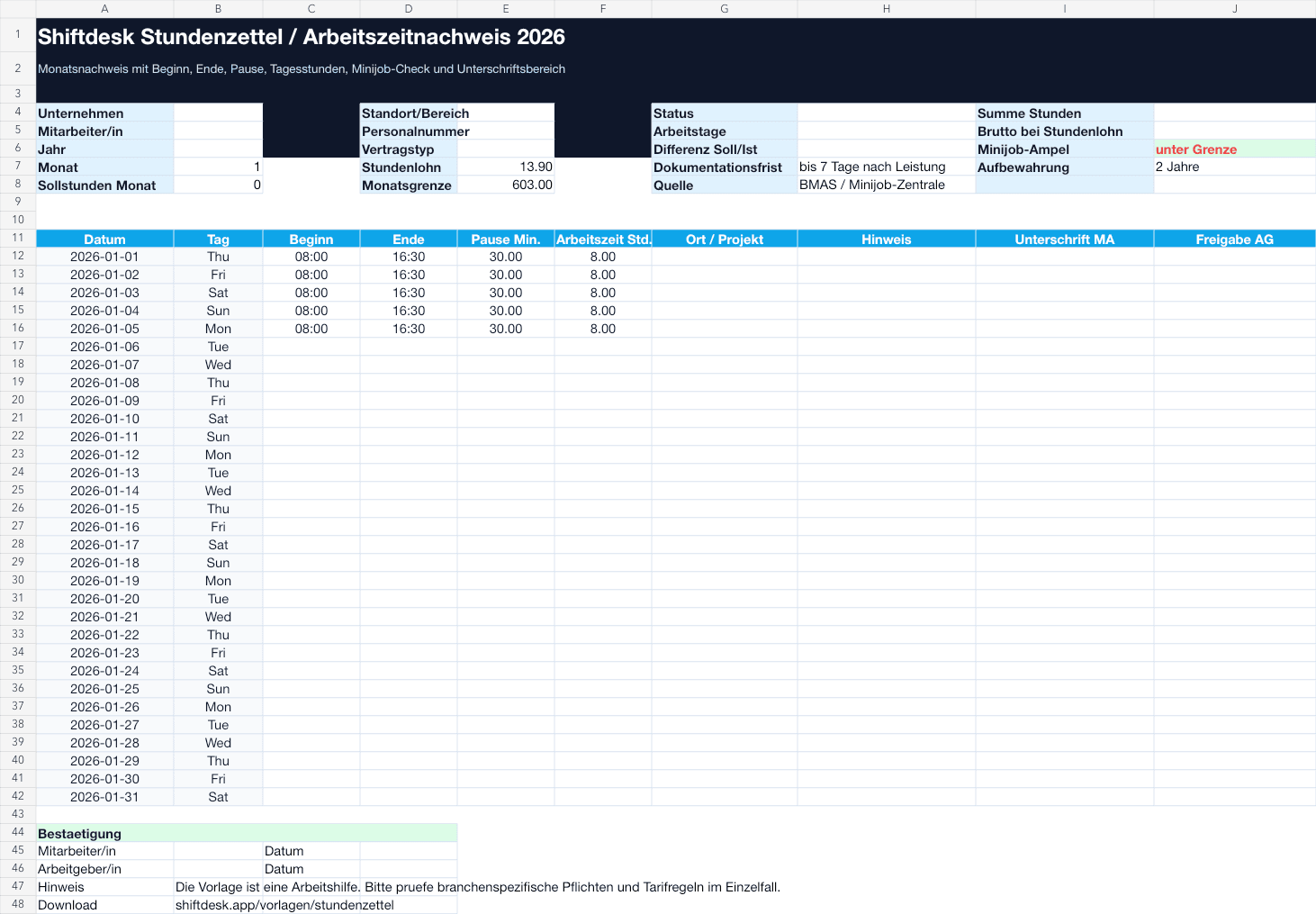
The existing Excel template with monthly grid, hour calculation and 2026 mini-job check – for intervals that do not cross midnight. Includes the original blank PDF working-time record.
Free · No sign-upDownload ExcelBlank PDF template 2026Timesheets 2027
New Excel edition with month selection, overnight calculations and 2027 mini-job guidance. The PDF pack includes all twelve months with dates and weekdays.
Free · No sign-upDownload Excel2027 PDF pack · 12 monthsOptional: tips by email
Want additional guidance on time tracking? Subscribe to our emails if you wish. Subscribing is not required for downloads.
Files are in German. Mini-job guidance applies to Germany. These templates do not replace case-specific review.
PDF timesheets: choose a month and year
January to December, each on one landscape A4 page. Dates and weekdays are prefilled and weekends highlighted. Enter start, end, breaks and hours by hand.
How to complete a timesheet: a working-time example
- 01
Choose a year and month
Download the matching edition. In the Excel sheet Monatsnachweis, click the yellow month field and use its arrow to select Januar through Dezember. Save a separate file for each employee and month: changing the month retains previously entered times. Monthly PDFs already include the calendar.
- 02
Enter actual working times
Record start, end and the break actually taken, in minutes. Do not substitute standard break deductions or planned shifts for actual working times.
- 03
Review and store
Check missing entries and warnings before using the monthly total. Keep records traceable and follow your business's recordkeeping requirements.
Example: 08:00 to 16:30 with a 30-minute break
8 hours 30 minutes of attendance minus a 30-minute break equals 8 working hours. Excel therefore shows 8.00 in the hours column. At an hourly wage of €15, that is €120 before other pay components.
The new 2027 Excel edition flags invalid time and break entries. It does not check working-time law, supplements or complete payroll. PDF templates do not calculate automatically.
What employers should watch in 2026
The template is a practical aid. It does not replace case-specific advice, but it highlights the points that are often missed in paper timesheets.
Record start, end and duration
A traceable working-time record should show start time, end time, break and actual working time separately.
Check documentation deadlines
For certain minimum-wage documentation duties, working time must be recorded no later than the end of the seventh following day.
Keep records organized
Working-time records should remain complete, legible and available for inspections. The template includes monthly and signature fields.
Watch electronic time tracking
Current BMAS guidance also permits handwritten records. Check separately which additional requirements apply to your business.
Reviewed September 13, 2026, for Germany. Check special cases, collective agreements and sector-specific rules with qualified support. The new 2027 files have their own notes. Both Excel editions provide a month dropdown and German weekdays; the 2026 hour calculations and reference values remain unchanged.
Digital time tracking
When timesheets create too much manual work: app, browser and PIN tablet connected to the schedule.
View hubBreak calculator
Check break and rest-time notices for concrete shifts before recording them.
Check breakMini-job hours 2026
Quickly compare monthly limit, hourly wage and possible hours for German mini-jobs.
Calculate hoursTime-tracking duty 2026
Read the guide to duties, acceptable forms and practical implementation in the business.
Read guideWhat the timesheet template includes
The file is structured so small businesses can start immediately while still keeping key checks visible.
Monthly grid with 31 days
Open the matching year and select a month in the yellow dropdown. Dates and German weekdays adjust automatically.
Automatic hour calculation
Enter start, end and break. Daily hours and monthly totals are calculated with formulas.
Mini-job guidance by edition
Each Excel edition includes reference values for its year. Hours and hourly wage provide a simplified pay estimate, not an assessment of employment status.
Sources and notes tab
The template contains a compact source section so key assumptions stay transparent.
When a timesheet is no longer enough
A template is a good start. Once several locations, changing shifts, mini-job limits, breaks or approvals come together, manual time tracking quickly becomes fragile. Shiftdesk combines scheduling, mobile clock-in, breaks, working-time accounts and payroll preparation.
Backfilling instead of live records
When times are collected only at month end, breaks, corrections and approvals are often missing.
No automatic plausibility check
Excel cannot reliably detect whether breaks, rest periods or mini-job limits look suspicious in a concrete schedule.
Versions via email or chat
Multiple files make it unclear which version was signed, approved or handed to payroll.
Payroll prep becomes manual work
Hours, absences and supplements must be transferred from timesheets into other systems.
FAQ about the timesheet template
Is the timesheet template really free?+
Yes. You can download the Excel and PDF files directly without signing up. The email pack is also free and uses double opt-in.
Can this be used for German mini-job employees?+
The Excel editions include reference values for 2026 or 2027. Hours multiplied by hourly wage provide guidance only. Check regular total earnings, special payments, multiple jobs and other exceptions separately.
Is an Excel timesheet enough for German time-tracking duties?+
That depends on the individual case and applicable rules. The template helps with documentation, but it does not replace automated, audit-proof or legal review.
What is the difference between a timesheet and a working-time record?+
In everyday use, the terms often overlap. A working-time record should at least make clear when work happened, which breaks were deducted and which hours resulted.
Are monthly PDF timesheets available for both 2026 and 2027?+
Yes. The downloads include all twelve months of both years with matching dates and weekdays. Choose the year and select a month. PDFs are designed for printing and manual entry; they do not calculate hours.
How do I record an overnight shift?+
The new 2027 Excel edition treats an end time earlier than the start time as the following day. For example, 22:00 to 06:00 with a 30-minute break gives 7.5 hours. Each row covers one interval of less than 24 hours. Document daylight-saving changes, split shifts and month boundaries separately. The original 2026 Excel edition is not suitable for this calculation.
Can I use the Excel template in Google Sheets?+
Yes, the structure and formulas are intentionally simple. After importing into Google Sheets, quickly check time formats and formulas.